Depositing fiat currency assets are now available on the Traiex Exchange platform.
If you wish to do so, please go to your Traiex Wallet and follow the instructions below:
Step 1.
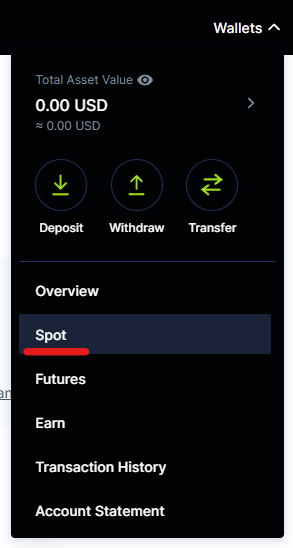
Navigate to the Traiex Wallet Page > Choose "Spot" under Wallet Type.
Note: This option allows you to deposit traditional, government-issued fiat currencies into your Traiex account. You can then buy cryptocurrencies with these funds.
Step 2.
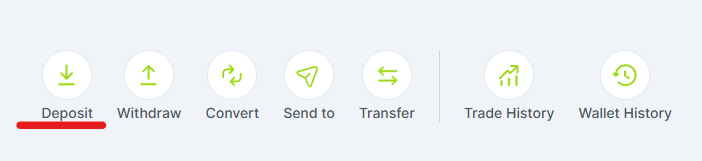
Click on “Deposit”
Step 3.
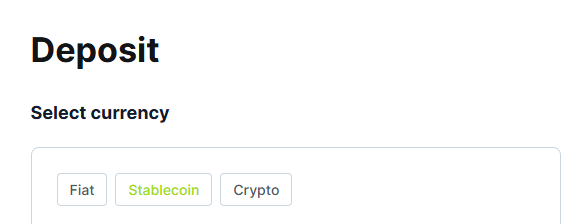
Select Your Preferred Payment Method and follow the instructions that appear.
Q: I just deposited fiat assets on my Traiex account. Why can't I withdraw them?
A: In line with the industry's anti-money laundering measures, Traiex has a 48-hour withdrawal holding period put in place immediately after each user's first fiat deposit transaction.
During this period the user will not be able to conduct fiat/crypto withdrawals, and will not be able to use the "send to" function. All withdrawal/send features will be re-enabled after the 48-hour holding period, and after Traiex verifies the source of the funds. Subsequent fiat deposit transactions will not have a holding period.
Was this article helpful?
That’s Great!
Thank you for your feedback
Sorry! We couldn't be helpful
Thank you for your feedback
Feedback sent
We appreciate your effort and will try to fix the article